Manual: Build queue management
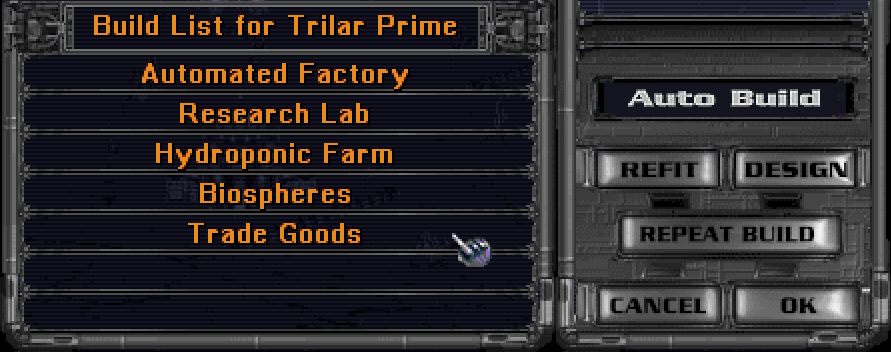
Build queues hold up to seven products. Eleven configurable presets can add, remove, reorder, or buy products in a colony's queue. The presets are part of data/orion2re.cfg; separate BUILD.CFG and BUILD0.CFG through BUILD9.CFG files are not used.
With multibuild enabled, queued items use stored PP plus this turn's PP. Any PP left after building stays on the colony balance, even if Trade Goods is next in the queue. Trade Goods converts only the colony's full current-turn PP when it is already selected at the start of a turn; it never spends or adds to stored PP.
Using queue presets
The preset keys are:
| Key | Preset |
|---|---|
Q |
0 |
1 through 9 |
1 through 9 |
0 |
10 |
In the Build screen, a preset applies to the current colony. In the Colonies screen, it applies to the selected colony; hold Shift to apply it to every owned colony other than outposts.
The built-in presets merge a general building priority list with Q, prepend ship designs 1 through 6 with the matching number keys, prepend a freighter with 7, prepend a spy with 8, add Housing with 9, and clear removable products with 0.
Configuring presets
A complete preset assignment contains space-separated instructions and must end with end:
colony build_queue 1 = prepend design1 end;
colony build_queue 7 = prepend freighter_fleet end;
colony build_queue 9 = housing end;
colony build_queue 10 = clear end;
Preset numbers range from 0 through 10. A preset has 200 instruction cells, including end, so it can contain no more than 199 executable instructions. Individual cells can also be overridden; see the build queue configuration reference for the accepted form and complete list of building names.
Products
Product names use lowercase words separated by underscores. They include:
- building names such as
automated_factory,research_lab, andmissile_base; colony_ship,outpost_ship, andtransport;design1throughdesign6;android_farmer,android_worker, andandroid_scientist; andspy,freighter_fleet,trade_goods,housing, andrepeat.
Insertion modes
append adds subsequent products at the end of the queue and is the initial mode. prepend inserts them before the first unpurchased product. merge selects matching products already in the queue and places the listed products in that selected region and order. Repeat markers remain attached to the products they repeat.
Modes remain active until another mode is encountered. A full queue prevents further insertion, but processing continues in case a later command removes an item.
Commands
| Command | Effect |
|---|---|
buy |
Buy the current product if buying is allowed. |
buy10, buy50, buy75 |
Buy the current product only after at least 10%, 50%, or 75% of its cost has been produced. |
unbuy |
Refund the current purchase and remove its bought production. |
clear |
Remove unpurchased, non-refit products. In merge mode, remove only selected products. |
clear_refits |
Remove unpurchased refits. In merge mode, remove only selected refits. |
clear_continuous |
Remove Housing and Trade Goods while preserving a purchased front product. |
stop |
Stop processing immediately. |
end |
End the preset. This is required in the configured list. |
repeat may follow a repeatable non-building product. It cannot follow Housing, Trade Goods, another Repeat, or most buildings; Terraforming and Colony Base are the building exceptions.
Invalid and unavailable items
Configuration loading rejects unknown instruction names, preset indexes outside 0 through 10, oversized lists, and complete lists without end.
When a valid preset is applied, every product is checked for the current colony. A product is skipped if it is unavailable, already built or queued where duplicates are forbidden, has no valid target, refers to a missing ship design, cannot allocate a ship, or cannot legally be repeated. A failed instruction does not cancel earlier changes and does not stop later instructions. This allows one preset to be useful at colonies with different technologies and local conditions.
Purchased products are protected from prepend and ordinary clear. Refits are protected from ordinary clear; use clear_refits to remove unpurchased refits. If the queue is full, products that do not fit are skipped.
Autobuild
The queue-driven Autobuild option must first be enabled:
colony autobuild enabled = true;
colony autobuild default = 0;
The default value only preselects a preset in the colony prompt; it does not assign Autobuild to existing or new colonies. Enable Autobuild from a colony's production controls and enter a preset number from 0 through 10. Submit an empty value, or use the same control again, to disable it.
The selected preset is applied immediately and again when the player submits each next turn, before that turn is processed. It is applied to the queue as it currently exists, not only when the queue is empty. Consequently, an autobuild preset containing clear, buy, prepend, or merge can perform that action every turn. Custom Autobuild is not applied to outposts or colonies owned by another player, and it is cleared when a colony changes owner.
When queue-driven Autobuild is disabled in configuration, the original Autobuild selector is used instead. That selector chooses among eligible buildings, Housing, and Trade Goods when a colony needs a new project; it does not replay a queue preset every turn. See AI production rules.
Multibuild
Enable multibuild with:
colony multibuild = true;
Normally a colony completes at most one queued product per turn. With multibuild enabled, stored, bought, and current net production form one pool. After a product completes, any remainder is applied to the next product, allowing several products to finish in one turn. If the next product is too expensive, the remainder is stored there.
Processing stops at useful Housing, Trade Goods, an empty queue, or a product that cannot yet be completed. Repeat production can complete repeatedly while enough production remains. Housing that cannot be used is removed according to the normal Housing rules; disabled Housing is removed and processing can continue.
Recovery behavior
Queue operations compact empty slots and remove a leading orphaned Repeat marker. If production-screen cleanup leaves a colony with no product, it falls back to Trade Goods. Preset products that are invalid for the colony are skipped rather than blocking later preset instructions. Normal game actions that invalidate specific queued products, such as removing a required building, also remove those products and reverse a purchase when necessary; presets do not otherwise reconstruct a damaged queue.
If a custom preset behaves unexpectedly:
- Disable Autobuild for the colony so the preset is not reapplied next turn.
- Use preset 10 or a custom
clearpreset to remove unpurchased, non-refit products. - Use
unbuybeforeclearif the purchased front product must also be removed. - Use
clear_refitsonly when queued refits should be cancelled. - Correct the preset in
data/orion2re.cfg, keeping its finalend, then restart or reload configuration as required.